Today was our first venture into Digital Publishing, so I wanted to stop by and share our experiences with it in 1st grade. Per Common Core, students are expected to “With guidance and support from adults, use a variety of digital tools to produce and publish writing.”
A 2-day week was a perfect time to set the foundation for the standard – how to use digital tools to publish our ideas. Before beginning the publishing process, we took the time to map out our ideas – “For what are we thankful?” I used this graphic organizer to help focus and guide students (you can grab it here for free). This writing was fairly guided, but it is our first attempt. As we become more comfortable with the technology, I will definitely bump-up my expectations and demands on students!
Once students finished brainstorming, I taught them how to use the app, My Story, as a whole group. With a whole-group lesson, I introduced just the basics (the name of the app, where to find it on the dashboard, how to create an author portfolio, and how to create a new book), and taught the specifics (adding text, taking pictures, adding illustrations) in smaller groups while the rest of my friends participated in some Thanksgiving-themed ELA centers. Before you start all this teaching, make sure to add the My Story app to the bottom dashboard. This eliminates a layer of stress and worry for students. Placing an app onto the Dashboard gives students easy access to it.
There is a $3.99 cost to the My Story app, but in my classroom, completely worth it! After a few basic trainings (how to capitalize letters, how to go back and add words, how to space, etc.) the app is very intuitive. Students can easily add pictures, drawings, text, and audio. I did work with students in 18 minute small-groups on basics of the app. After the first 6-7 students, students were comfortable exploring the app themselves and ready to create their first book. I did stay close by to answer questions, of which there were many.
Overall, it was a successful (but stressful) first venture. I definitely should have brought a Diet Coke today. 🙂 My friends were awesome. It was me who forgot they are SIX (not 5th graders!) – ha. It was a great lesson in patience as I used my words – not my hands – to explain how to work with this publishing app.
As students worked, I asked that they finish all the text before adding illustrations or audio. Students added their 4-5 pages of text, then added their illustrations/photos, and lastly, they added their audio.
Out of my 23 friends, 11 friends published their Thankful Books today. Typically, I would not want or expect students to finish in such a small about of time…BUT we are confined to 2 days, our goal was learning the technology – developing our writing will come later, and they are 1st graders. There is an aura of awesomeness to publishing a book!
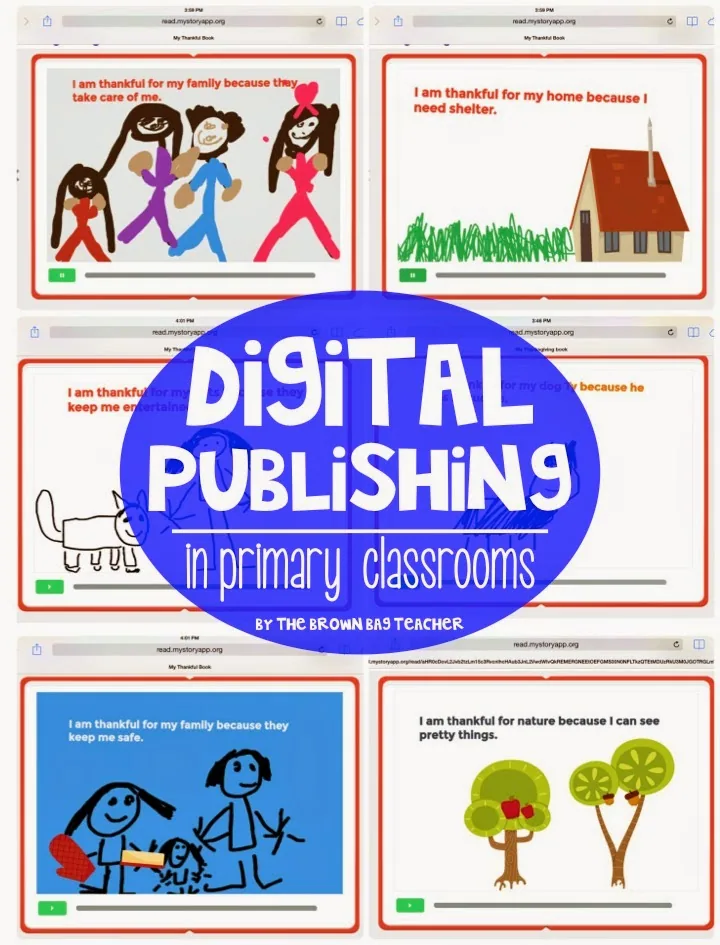
As you’ll see below, students had a lot of choice when creating their books – text color, background color, type of illustration (hand-drawing, photo, clipart graphics, or a combination of all 3). You’ll also notice the green play button at the bottom on of each picture, this is audio of students reading their book.
After publishing their books, we added the Thankful Books to our iBook Shelf on our iPads (so friends may read them), and I emailed the links to the books to our families. I love how My Story makes it easy to celebrate and share my friends awesome writing. Plus, all parents/grandparents/aunts love 1st-grader drawings, writing, spelling, and reading. It’s just a fact, I say. 😉
Well, friends, it really was a great – but exhausting – day. I definitely needed a Diet Coke, but my friends learned SO much about using iPads to share our writing, and they were thrilled to become real authors. It was such a sweet moment to see my friends’ smiles as they shared their books with their friends. First grade rocks!
Sounds like so much fun! I love having my students create ebooks! We use Book Creator (better for the older grades), but the app you used looks great and student friendly!! We haven't done it yet this year, but reading your post makes me want to have them get started on something when we go back to school! Hope you have a wonderful Thanksgiving, friend!!
This post has completely inspired me! I will be sharing this app with my firsties and will be sure to blog about it and leave you credit! What a wonderful way to share writing!
Thanks for sharing & I hope you drank a nice cold diet coke!
Thank you for sharing Catherine. I knew you were a talented upper grade teacher when I met you in Vegas, but your equally as talented with the little ones. I'm so glad your new teaching position is going well. You are doing amazing things, my friend! Kristen
This is great! I know you have iPads in your classroom, however, have you heard about any good story writing apps for the Chromebooks? I'd love some ideas. Thanks! Jamie Thrills in Third Grade
I have tried this and am having trouble sharing or publishing,,,any advice….
Get teaching tips and free resources
Practical K-2 math and upper-elementary morphology ideas, straight to your inbox. No spam, unsubscribe any time.



5 Responses
Sounds like so much fun! I love having my students create ebooks! We use Book Creator (better for the older grades), but the app you used looks great and student friendly!! We haven't done it yet this year, but reading your post makes me want to have them get started on something when we go back to school! Hope you have a wonderful Thanksgiving, friend!!
This post has completely inspired me! I will be sharing this app with my firsties and will be sure to blog about it and leave you credit! What a wonderful way to share writing!
Thanks for sharing & I hope you drank a nice cold diet coke!
Elizabeth
Learning with Lizz R.
Thank you for sharing Catherine. I knew you were a talented upper grade teacher when I met you in Vegas, but your equally as talented with the little ones. I'm so glad your new teaching position is going well. You are doing amazing things, my friend!
Kristen
This is great! I know you have iPads in your classroom, however, have you heard about any good story writing apps for the Chromebooks? I'd love some ideas. Thanks!
Jamie
Thrills in Third Grade
I have tried this and am having trouble sharing or publishing,,,any advice….