Today I am sharing with you one of my great frustrations about 5th grade…the lack of resources. We are a curriculum-free school for reading and writing, so in August I walked into a resource-empty classroom. It has taken me months to find my ‘go-to’ websites, apps, and databases that are rigorous enough (i.e. long enough, with a 800-1000 Lexile Level) and interesting for my students. Without further ado, here are my 3 favorite websites for finding nonfiction articles that are (1) appropriate (2) rigorous and (3) interesting.
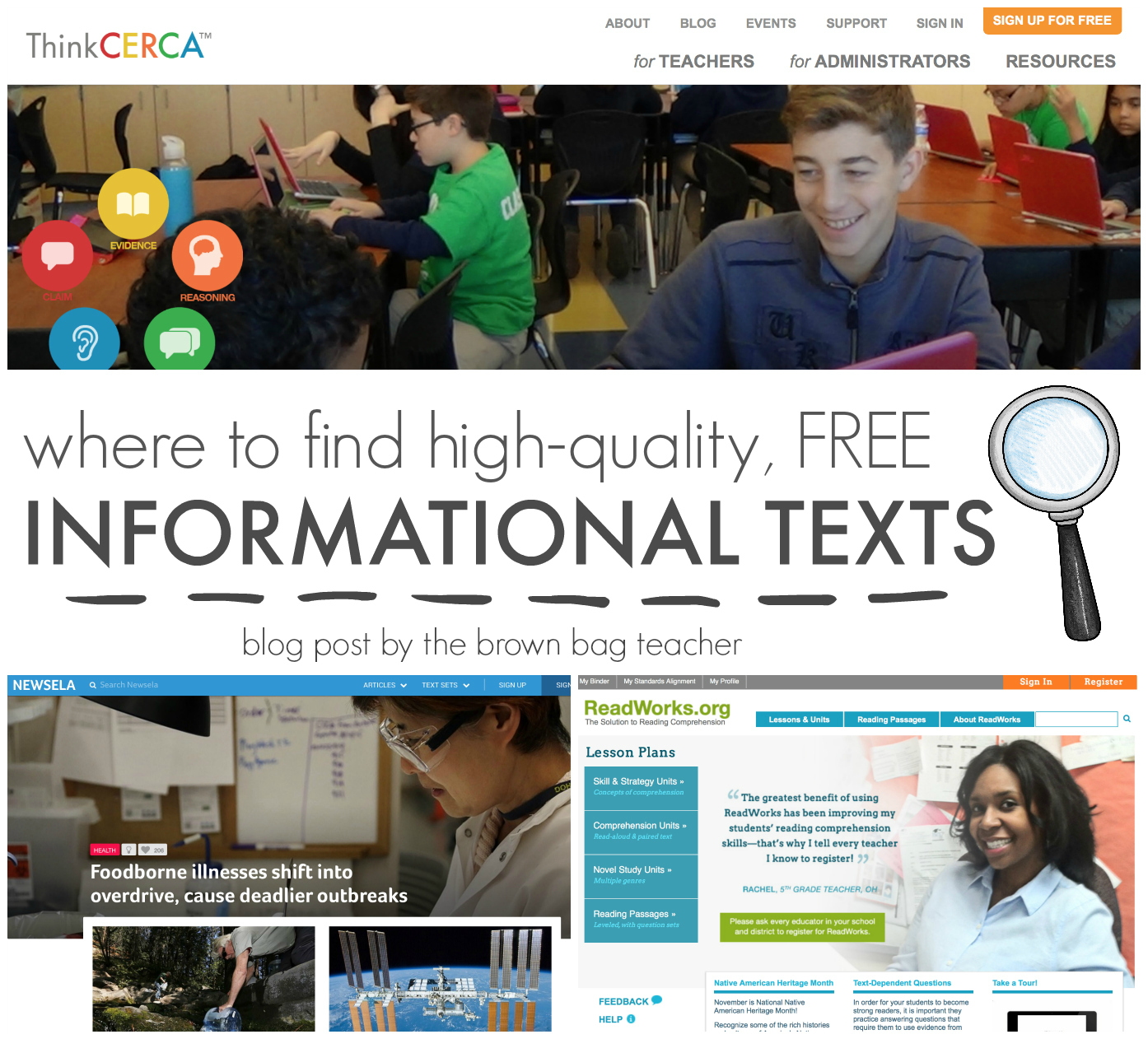
The first resource my kids LOVE is NewsELA. News ELA is a website that offers free news articles for teachers and students. With hundreds of articles {updated weekly}, articles on War & Peace, Science, Kids, Money, Law, Health, and Arts are all featured. With an account, you can view the articles online or print them out.
Every article is available in 4-5 different Lexile Levels that you choose using the blue menu to the right on each article!!!! Regardless of the level, the students are reading the same article just at their just-right reading level! Talk about differentiating!
Articles marked with an anchor have Common Core aligned quizzes. Each quiz is aligned to a certain ‘anchor standard’. As students take the quizzes, your Teacher Binder automatically updates with the level of quiz students took and their score on the Common Core standard assessed.
On a computer, students have the option to highlight portions of the text! On their second read of an article, I ask students to highlight the main ideas in one color and the supporting details in a second color. As a teacher, I can see what they highlight on my dashboard. Since main idea is something we always need more practice with, this is a great informal assessment!
ThinkCERCA is the 2nd resource I now pull articles from and is very similar to NewsELA. It has a different mix of nonfiction articles and three particularly awesome features.
An audio feature that reads each article aloud to students. This is such a luxury and a perfect feature for students who receive a reader. Plus, it allows students access to an article they might not be comfortable reading independently during literacy centers (when there is no reader available)!
Teachers also have the option to input their own “Extended Response/Short Answer” questions. These constructed response questions appear on students’ screens (iPad, moblie device, or computer), and students are given a space to respond. Student responses then appear on your Teacher Dashboard.
Additionally, ThinkCERCA has an embedded dictionary within each article. This dictionary allows students to click on a highlighted word, hear it read aloud, and see a definition for the word. Nonfiction articles are more likely to contain content-specific vocabulary that many students struggle with, and this feature helps students gain independence and confidence while reading!
Last, but definitely not least, is ReadWorks. ReadWorks is a tried and true gem hosting fiction and nonfiction articles that center on a specific reading skill. With a ridiculous search browser, you can sort articles by keyword, Lexile Level, Domain, and Reading Skill!!!!
ReadWorks trusts the teacher and allows the searcher to hone their survey to a specific reading skills. Point of view, cause and effect, inference, plot, main idea, vocabulary in context – these are just a few of the dozens of skills they have articles to target!
Each article is between 3/4’s of a page and 2ish pages in length making the articles readable, analyzable-able, and discuss-able (sure, it’s a word ;)) within my 55 minute reading block!
ReadWorks does not stop by providing single reading passages, they have also created Common Core aligned skills units that include novels to reference, teaching sequences, lesson plans, and assessments….all for FREE {no strings attached}. My favorite units are the paired text units for 5th and 6th grade. Pairing texts helps me meet with “comparing” verbage of the Common Core and teaches students they have to analyze and integrate the information their reading! Love. It.
Wow! What do you think? I hope you learned about a new resource or were encouraged to start using a resource you long-ago created a username for. 😉 So, now tell me, what are your go-to resources for finding articles to read in class?? Please share them. I am *always* looking for places to find articles! For other FREE classroom resources and freebies, sign-up here for teaching ideas to land in your inbox each month.
I love dogonews.com for current events nonfiction news! My students beg me to read them! They can use the ipad to read the article and I sometimes have them do context clues work with them, also. They can read the article and then there are blue words they can determine the meaning and then click on the word to check. I also have a bulletin board of these articles and I update them so my students can grab them for our nonfiction silent reading time!!
Thanks for the information. I use k12reader.com sometimes, too. You might find some things you like there as well.
 The first resource my kids LOVE is NewsELA. News ELA is a website that offers free news articles for teachers and students. With hundreds of articles {updated weekly}, articles on War & Peace, Science, Kids, Money, Law, Health, and Arts are all featured. With an account, you can view the articles online or print them out.
 ThinkCERCA is the 2nd resource I now pull articles from and is very similar to NewsELA. It has a different mix of nonfiction articles and three particularly awesome features.
 Last, but definitely not least, is ReadWorks. ReadWorks is a tried and true gem hosting fiction and nonfiction articles that center on a specific reading skill. With a ridiculous search browser, you can sort articles by keyword, Lexile Level, Domain, and Reading Skill!!!!

34 Responses
I love dogonews.com for current events nonfiction news! My students beg me to read them! They can use the ipad to read the article and I sometimes have them do context clues work with them, also. They can read the article and then there are blue words they can determine the meaning and then click on the word to check. I also have a bulletin board of these articles and I update them so my students can grab them for our nonfiction silent reading time!!
Thanks for the information. I use k12reader.com sometimes, too. You might find some things you like there as well.
Read, Write, Think is an awesome resource.
Thank you for the amazing FREE resources. Here's another really great one I've used over the years: https://student.societyforscience.org/sciencenews-students
Happy New Year!!
Here's a great addition to your list!
http://www.readtennessee.org/read.aspx
rwnljkhqbjnrqqdzrfwewoypwuglha
azhgkohuxzcqqfevkbogaicmglqycb
svdyymsrgshsccjiqzcmfwjlqtwuje
qxjxbuwodibqywarvqabrwmnqmvlij
ocphxjtvpmtaqyfzgemmrsrxlomeen
czndcaozhaofnyozmibboclpouychh
qsmektgjfonfkuhtopwplxozkafeqo
iongyilnulztxwsahdmqqhzrtgoidb