These 30 interactive Counting and Ordering Numbers to 120 games are ideal for distance learning, math centers, a technology center, or reviewing content with your students. These games do not provide any direct instruction and are intended for supplemental practice.
**SeeSaw(TM), Google Slides (TM), and PowerPoint versions now included**
These 30 interactive Counting and Ordering Numbers to 120 games are ideal for distance learning, math centers, a technology center, or reviewing content with your students. These games do not provide any direct instruction and are intended for supplemental practice.
In this resource, you will find
Teacher Directions
Visual Directions for Students
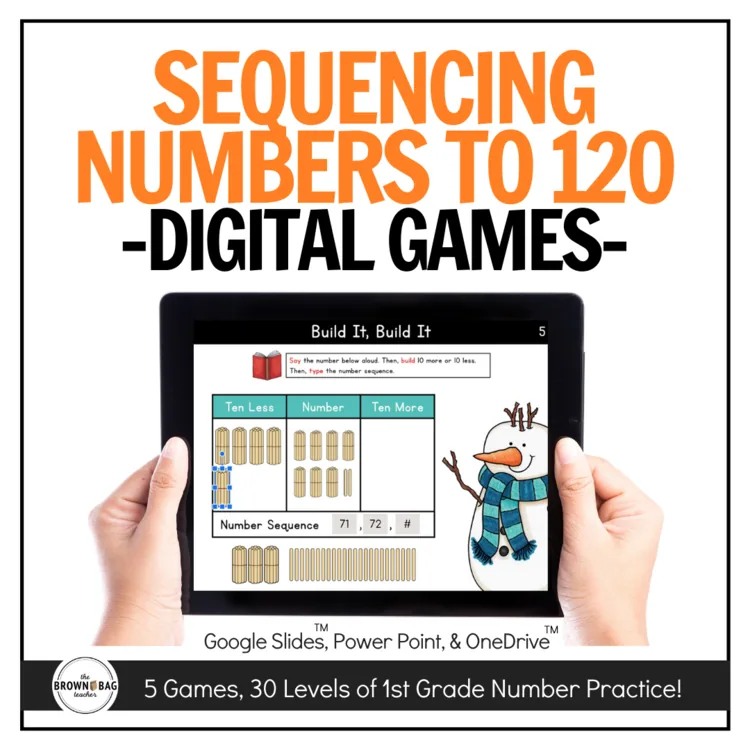
5 Ordering Numbers to 120 digital math games (SlidesTM, PowerPoint, Microsoft TeamTM), each with 6 levels increasing in difficulty (30 total learning activities)
Build It, Build It
I can show numbers 0-120 in different ways.
I can show one more, one less, ten more, ten less with models.
Missing Numbers
I can count to 120, starting at any number.
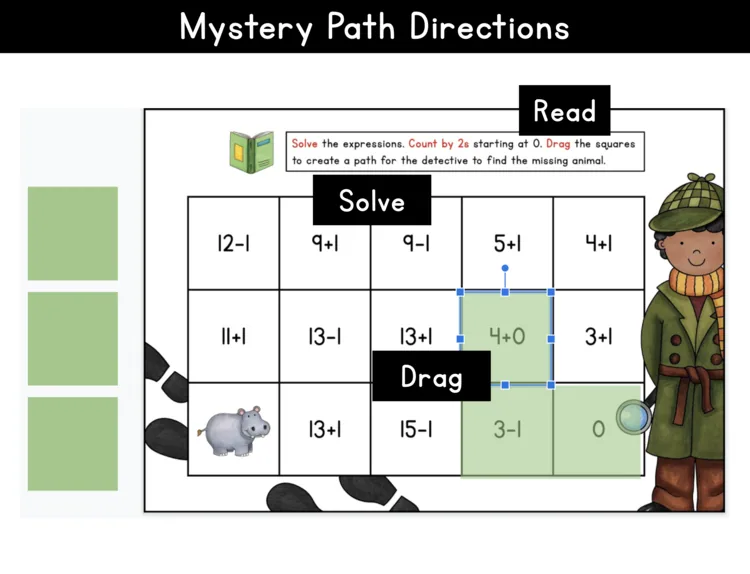
Mystery Path
I can count by 1s, 2s, 5s, and 10s within 120.
I can name one more and one less within 120.
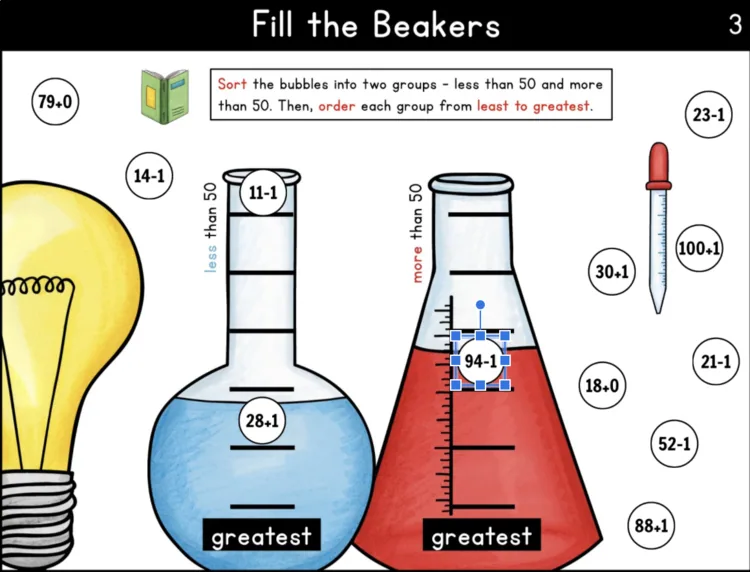
Fill the Beakers
I can compare numbers using less and more (no symbols).
I can order numbers from least to greatest.
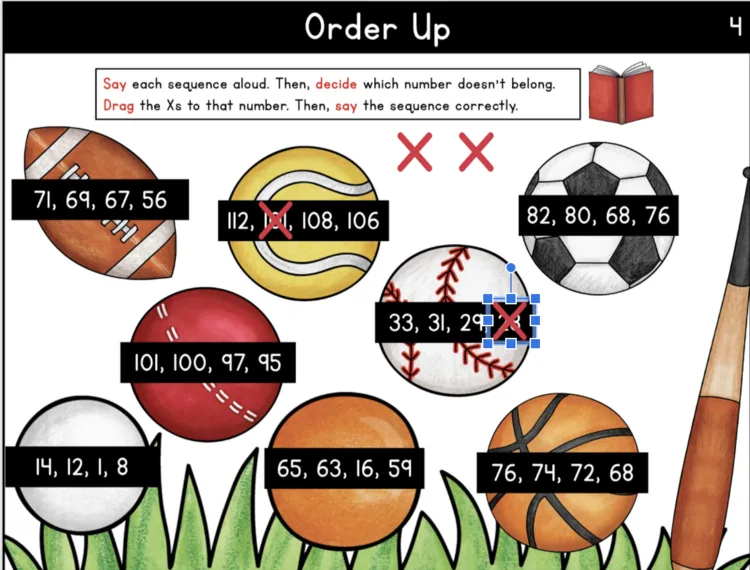
Order Up
I can count by 1s, 2s, 10s forwards and backwards.
Can I share this with students?
Yes! On a protected site or platform, you are welcome to share this digital file with students and families. That might look like a Google Classroom, a password-protected website, a password-protected Flip Grid, etc. Due to copyright, the digital file may not be placed on a class website that is accessible to the general public. Have questions? Ask a Q&A on Teachers Pay Teachers, and I’m happy to answer!
With what programs is this compatible?
This digital file is able to work with Power Point, GoogleTM Slides, Google DriveTM or Microsoft OneDriveTM. Then students may submit their thinking digitally. For instructions on how to use this resource with Microsoft OneDriveTM visit bit.ly/digitalinstructions
Can I share just one or a few games at a time?
After you make a copy of this digital file and add it to your Google Drive, you are free to manipulate the slides. You can add/delete/or move around the games to meet the needs of your students. Only want to share one set of games? Perfect. Delete the other slides and share the file via Google Classroom for your students. (Or select the slide you want to Assign > File > Make a Copy > Selected Slides. You’ll be asked to rename the file and you can share it with students. Then, when you want the rest of the games, you can come back to this link and reopen the original file.
For students to play the games, the Google Slide must not be in presentation mode.
How can I scaffold student work during remote learning?
•Audio: Download the Talk + Comment extension from the Google Chrome Store and you can easily leave quick audio comments on different slides explaining the tasks or giving feedback.
•Videos: Want students to watch a quick video or mini-lesson before they begin? Add a new slide to the beginning of the document and link the video or task you want students to complete before beginning.
Happy Teaching!
Catherine, The Brown Bag Teacher
33 reviews for Counting & Ordering Numbers to 120 Digital Games (1st Grade), Distance Learning
Rated 5 out of 5
Elizabeth Olive –
This resource was great for helping my students understand the concept!
Rated 4 out of 5
Katharine P. –
This has a lot of great activities in it. I am planning to assign on Canvas for students to enjoy
Rated 5 out of 5
Aleshia B. –
This was a good tool to use when my school was doing online classes.
Rated 5 out of 5
Katherine M. –
Really great resource for digital learning!!
Rated 5 out of 5
Snickers Funhouse –
This was great practice for my kids!
Rated 5 out of 5
Vajira P. –
Students enjoyed working through the problems.
Rated 5 out of 5
Lauren E. –
These digital math games are amazing! They were perfect for remote learning and I will use them for in-person learning for a digital math game center! Thank you for making wonderful resources!
Rated 5 out of 5
sherry K. –
Would like to be able to edit numbers for specific students. Overall, great product.
Rated 5 out of 5
Claudia S. –
Amazingly engaging and easy to use. Assign in Seesaw and ready to roll, plus the students loved them!
Rated 5 out of 5
Jaclyn C. –
This made for a GREAT center for my students!
Rated 4 out of 5
Tanya L. –
This was a great resource for practice during distance learning. The only modification I would request was the ability to edit the numbers so you could make the assignment a little longer. Some of the slides took a short time to complete and the additional slides included didn’t have the same format of the skill we were practicing.
Rated 4 out of 5
Love to teach in VA –
Thank you!
Rated 5 out of 5
1st Grade Made –
Thank-you for this resource … it was just what I needed!
Rated 5 out of 5
Kara P. –
Great practice for my students and they enjoyed it. Thank you
Rated 5 out of 5
jennifer N. –
My students loved using this resource. Thanks so much!
Rated 5 out of 5
Jennifer S. –
I used this during distance learning with a small group on Zoom. I shared my screen. The students enjoyed playing the game.
Right after you check out, your download links are on the order confirmation page, and your receipt email has the same links. Don’t see the email? Check your spam or promotions folder.
Each resource downloads as a .zip folder that holds all of its files.
iPhone or iPad: open the Files app, find the zip in Downloads, and tap it. It unzips into a folder you can open.
Mac: double-click the zip.
Windows: right-click the zip and choose Extract All.
My file won’t open or shows a file-path error.
This usually happens on Windows when the files are unzipped inside the Downloads folder, because the folder path gets too long. Move the zip to your Desktop, then right-click it and choose Extract All.
Still stuck? Reach out and I’ll help.
Do I need an account?
No, you can check out without signing up. An account is created for you automatically with the email you use at checkout, and you’ll get an email to set your password. If you already have an account, your order is added to it.
All major credit and debit cards, Apple Pay and Google Pay (through Stripe), plus PayPal and Venmo. Payments are processed securely, and your card details never touch this site.
What is your refund policy?
Because these are digital resources, they can’t be returned once they’re downloaded. Please look over the product description and preview before you buy.
If something is wrong with a file, or you bought the same resource twice by mistake, reach out and I’ll make it right.
Practical K-2 math and upper-elementary morphology ideas, straight to your inbox. No spam, unsubscribe any time.
They can make ten. Can they use it?
Help students turn “I know ten” into “I can use ten.”
Join me for a hands-on workshop exploring what to model, which questions to ask, and how to respond when students get stuck using ten to add and subtract.
Includes a printable Teacher Toolkit, ready-to-use Number Talks, and the workshop recording.

Elizabeth Olive –
This resource was great for helping my students understand the concept!
Katharine P. –
This has a lot of great activities in it. I am planning to assign on Canvas for students to enjoy
Aleshia B. –
This was a good tool to use when my school was doing online classes.
Katherine M. –
Really great resource for digital learning!!
Snickers Funhouse –
This was great practice for my kids!
Vajira P. –
Students enjoyed working through the problems.
Lauren E. –
These digital math games are amazing! They were perfect for remote learning and I will use them for in-person learning for a digital math game center! Thank you for making wonderful resources!
sherry K. –
Would like to be able to edit numbers for specific students. Overall, great product.
Claudia S. –
Amazingly engaging and easy to use. Assign in Seesaw and ready to roll, plus the students loved them!
Jaclyn C. –
This made for a GREAT center for my students!
Tanya L. –
This was a great resource for practice during distance learning. The only modification I would request was the ability to edit the numbers so you could make the assignment a little longer. Some of the slides took a short time to complete and the additional slides included didn’t have the same format of the skill we were practicing.
Love to teach in VA –
Thank you!
1st Grade Made –
Thank-you for this resource … it was just what I needed!
Kara P. –
Great practice for my students and they enjoyed it. Thank you
jennifer N. –
My students loved using this resource. Thanks so much!
Jennifer S. –
I used this during distance learning with a small group on Zoom. I shared my screen. The students enjoyed playing the game.