Connecting families to the classroom and giving them the tools to work with students at home is a huge part of our jobs as teachers. Although I use many modes of parent communication (you can read about them in this blog post), I love having a ‘landing’ where families always have access to the information they need. Emails bounce back, texts are sometimes erased, and paper newsletters reside in a mystical land of lost home/school folders…do you feel me? My classroom Weebly site is always available and contains all of our must-know classroom information – dates, newsletters, photos, videos, and learning resources.
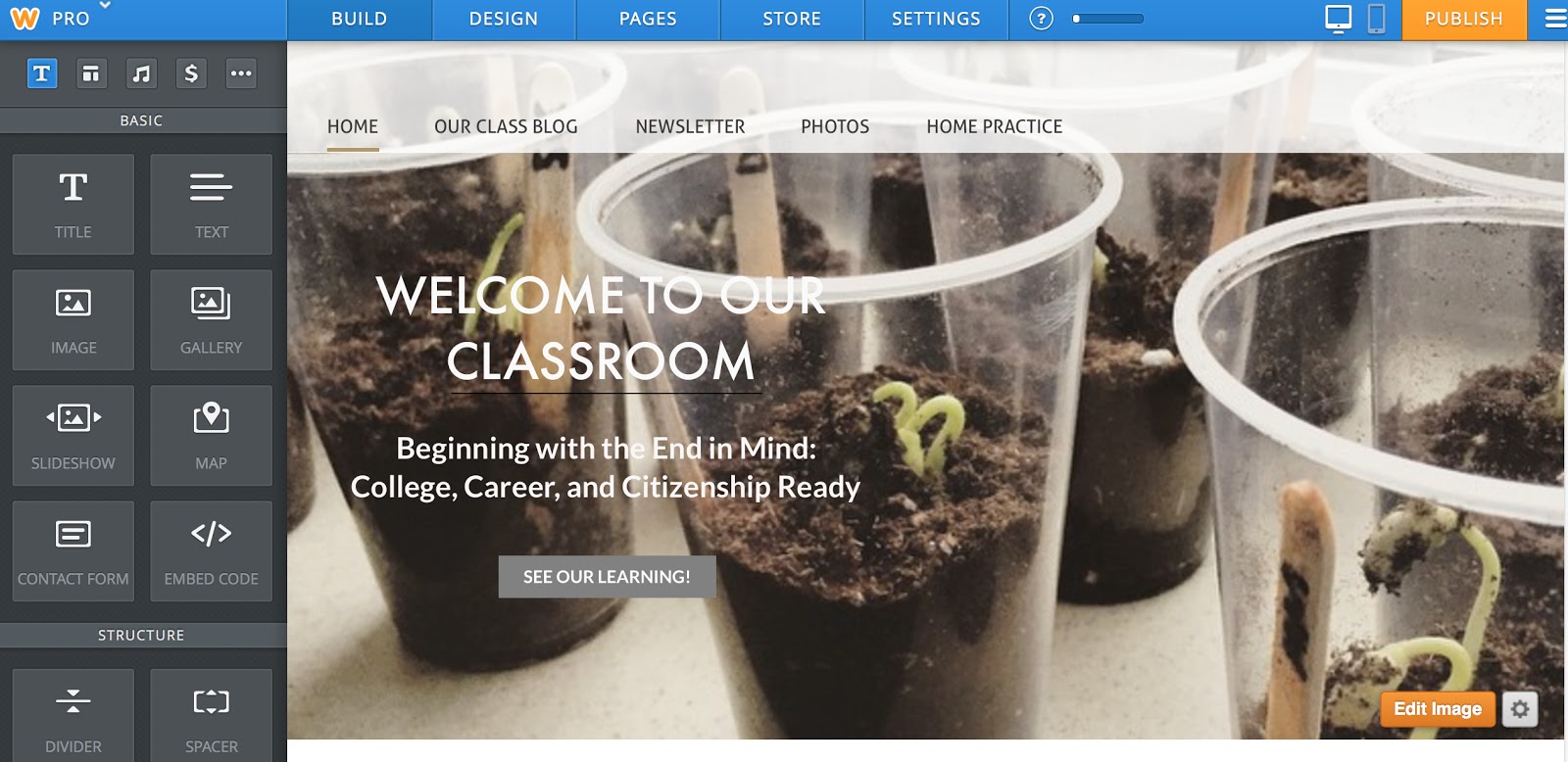
Weebly is a free and SIMPLE blogging platform. Unlike Blogger, Snapfish, or WordPress, Weebly is all drag-and-drop. Once you create a website and choose a template (there are dozens of different templates), you will see the grey menu on the left of your screen (as seen below). Here you have lots of choices that you can drag and drop into the body of your website. Boom – it’s that easy! There is no coding or building or creating, just dragging and dropping the features you want.
Using the blue menu at the top of the screen (seen below), you can also create and organize your web-site pages. On my website I’ve created 4 pages – our Class Blog (an easy feature to add-on to your website), our Newsletter, our Photos, and Home Practice.
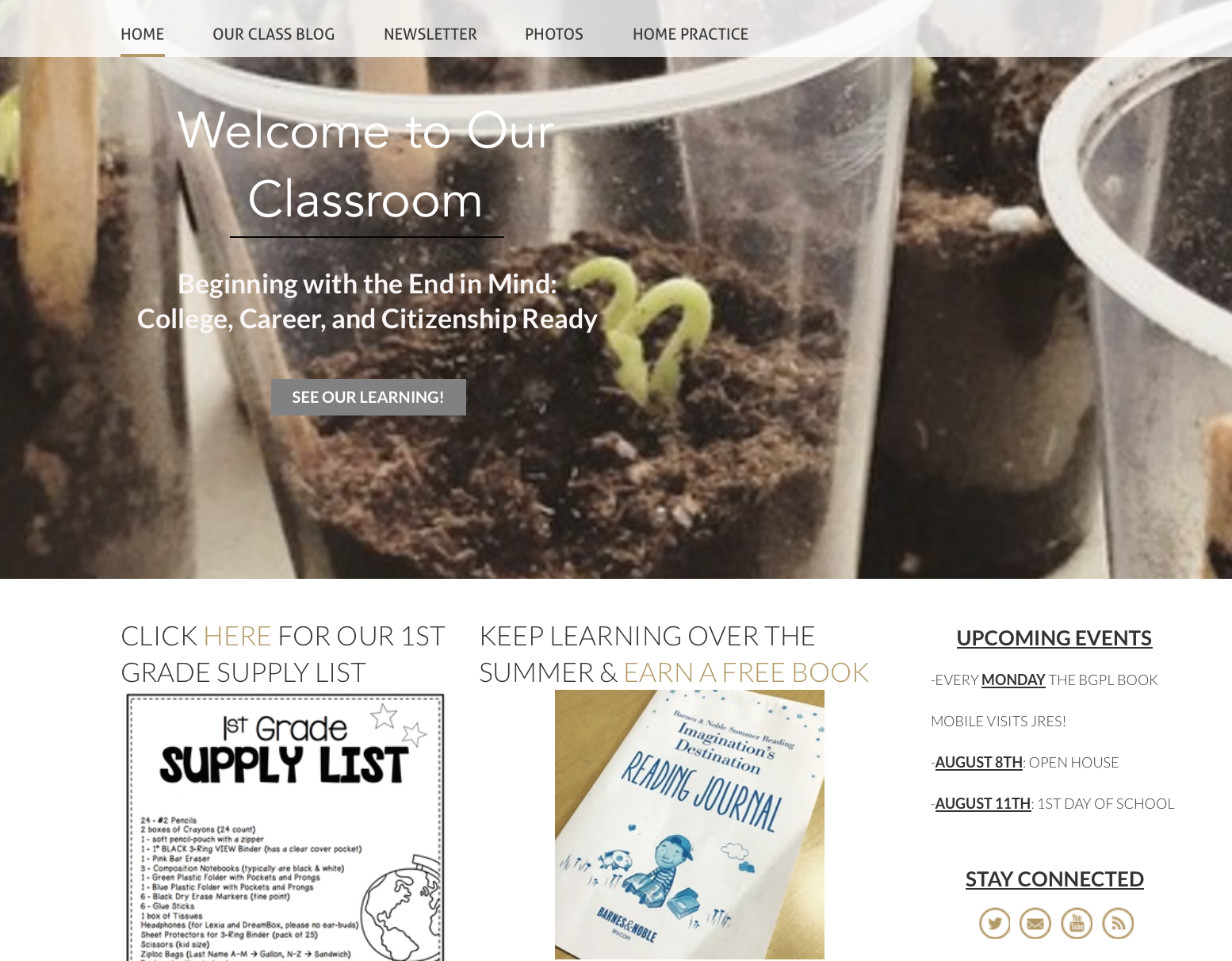
When families go to our website, they arrive at our Home landing page. I created three columns by dragging 3 pictures/text/headings side-by-side (it’s that easy!). If I were to take out the ‘Upcoming Events’ text, the other two columns would automatically fill the page. I wouldn’t have to readjust them.
On our Home page, I typically link 2 blog posts or photo albums that have been recently added. Sometimes I link to outside resources. Right now, I’m linking to Barnes and Noble Summer Reading Program. In the 3rd column, I’ve dragged-and-dropped a text box for Upcoming Events, as well as, ways for families to stay connected (email, Twitter, YouTubes, etc.)
Now, for the individual pages on our class website.
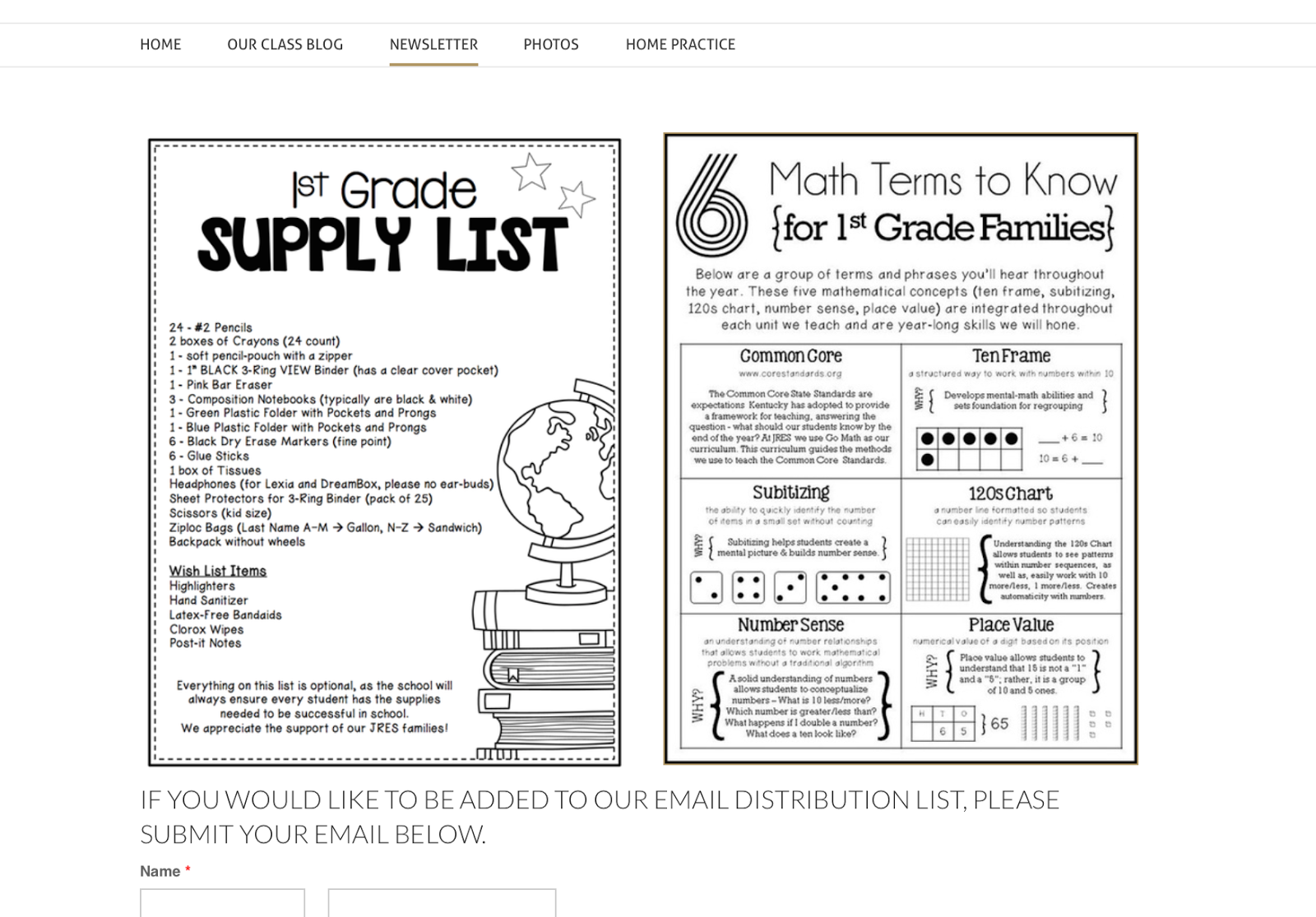
On our Newsletter page (below), I upload photos of our weekly newsletter and any information I’ve sent home in our Home/School folders. Right now, I’m preparing for August, so I traded-out our classroom newsletter for our supply list and math-resource page. Weebly has a great linking feature, so if families click on either photo they can download the documents.
At the very bottom of this page, you can also see the beginning of a Contact Form. This is another drag-and-drop feature on Weebly. If family members or someone in the school wants to be added to our email distribution list, they can fill out the form on this page, I receive an email, and I’ll add them.
On each page of your website, you can choose whether or not you want a header. On our Newsletter page (above), I opted for no header but on our At-Home Practice page (below), I’ve included a simple picture (from Weebly’s stock photos) and a title.
Within each page, you can drag-and-drop pictures, text, headings, or videos. Within our At-Home Practice page, I’ve included logos to learning resources and then, added the weblink so families can click on them and be instantly connected. I’ve also included the usernames and passwords, so there is easy-access on the weekends and over breaks.
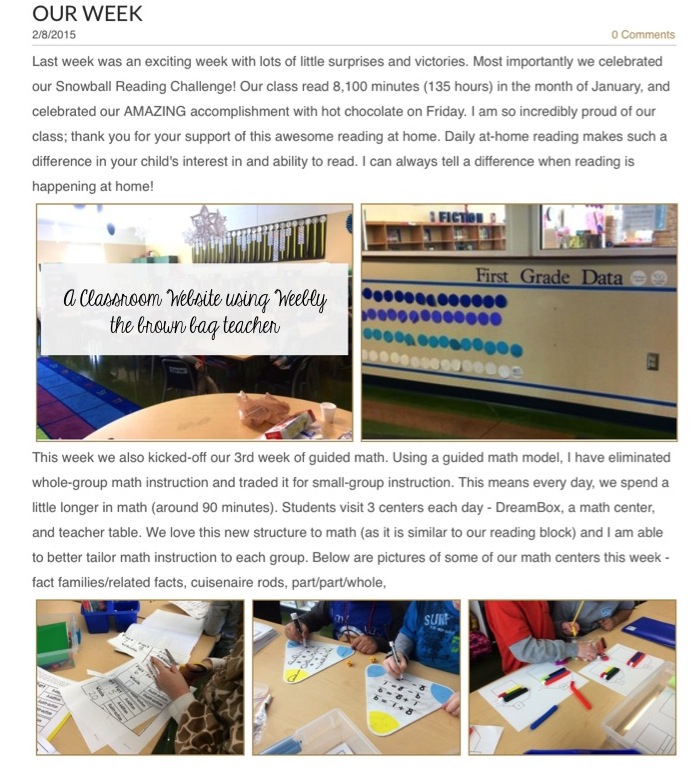
The bulk of my website traffic is directed toward Our Classroom Blog (a sample entry is below). In this space, I share weekly posts about our learning, pictures of us in action, explanations of our classroom routines, and some of the ‘why’ behind the methods we use to learn (i.e. What is Daily 5? Why do we build Reading Stamina? What is Guided Math?).
If students are really struggling with a certain standard (i.e. fact and opinion), I share low-key ideas for practicing this skill at home. With our Classroom Blog, families go from being aware to being invested. I want to give parents a clear picture of what is happening in our classroom, why, and how they can help at home.
Below is the beginning of a February post. (Please excuse the grey rectangle; those are my awesome 1st graders!) Every 2 weeks (preferably more often), I sit down and share about our learning. I try to include information/pictures from each content area – reading, math, writing, and theme. Sometimes I’ll even sneak into specials early and take videos/pictures of my friends painting, tagging, playing xylophones, or learning to type. 🙂
One of the reasons our classroom website works is because I promote it. Every time I post photos or a blog post, I text it out to families using Remind, as well as, Tweet it out using our classroom Twitter account. Also, my 1st graders know we have a class website, and I’ll also tell them when I post. They love going home to ask their families to look at the pictures. It’s super exciting to them!
Now, I must have a moment of true confession. ALL of the above features are available with the FREE Weebly account…but I do pay the pro yearly fee ($80/year). Why, you ask?
(1)Website Traffic – I love my classroom website and truly feel like it’s a fabulous method of communication. BUT if my families weren’t using it, I would want to know that and make another plan. I like seeing how often my website is visited and how people are accessing it (what pages, from what links, etc.) (2) Ad Free – Although there are very few ads (usually just one at the bottom of the page) with a free account, it still drives me bonkers. (3)Password-Protected Pages– with a paid account I can password protect any or all of the pages on my website. So, if I wanted to or families asked, I could put a password on our Classroom Blog or Photos tabs, so only people with the password would have access to these pages.
So friends, this is Weebly. It’s versatile, simple to use, and creates stunning websites. If you’re looking for an online platform for your class website, I’d say – “Go for it!”
Now, please tell me – what do you currently use as your class website platform? Do you like it? I’d love to hear your ideas, questions, and/or general reservations!
I love using Weebly for our website! We had to create one in one of my undergrad classes for a "fictitious" class and I fell in love! But the way you have structured yours make me want to revamp. Putting it on my ever growing to-do list! Kelli Tales of a Tenacious Teacher
Thank you so much! I absolutely love it, and love how it looks. Summer to-do lists are the best, right?! 🙂
I use Weebly for my classroom website. I upgraded to the Starter package and I am so glad I did! I can add an unlimited number of pages! I will be making sure to utilize it even more this school year! I am still working on updating it, but please check it out! http://thepickettpress.weebly.com/
Great start, April! I love that you have a tab and direct link for Scholastic Reading Club. That is a fabulous idea. I think I'm going to steal it. 😉
I have never used Weebly. I used edublogs for awhile because I wanted my students to be able to comment to practice reading and responding to a prompt on the computer. I teach third grade and their tests now are on the computer where they read and type. Is Weebly able to do this? I had planned on using my classroom to blog as a means for them to read and respond, but Weebly may be better.
What design did you use? I have tried several and none of them allow me to add to the bottom of the page (where you created the three sections on your homepage.)
Hi Samantha! I used Clean Lines and love it. It has the one large picture on the front and then you scroll down to add drag-and-drop features!
Great post! Almost every teacher in my school uses Weebly. Our school website is also on Weebly, and there is LOADS of info on it. I like my site, but I need to be consistent about posting more frequently.
You can check out both sites: macksites.weebly.com mrsmusa.weebly.com
This sounds great. Looking forward to exploring. I liked the free part. I just wished educational items wouldn't be costly. All I do is spend, spend, and spend. ?
Hello! The free Weebly for teachers and fantastic. There is no real reason to upgrade (I just wanted some additional features.) In fact, all the teachers at my school have Weebly sites, and I think I'm the only one that pays!
I feel like I should be easily figuring this out, but how did you have an image that linked to another website (like for your resources). Do you have an easy way of creating those links? Love the inspiration- thank you!
Yay! I'm so glad you figured it out. Just in case anyone else is wondering – just click on the image. Click Link (sometimes under the Advanced tab) and then, insert the document or web link. 🙂
Thank you! You completely inspired me and I sat down and made one in a short amount of time that is ALMOST ready to roll for Fall!!! You rock
Thanks for this post! I really want to try this out with my class this year. I'm going to want to make the blog private so I can use pictures of my kids so I'll probably be upgrading.
I love this post. I need to freshen up my class website and am thinking of moving to weebly. Do you use the version for education or did you just go through the main site?
Really informative post, thank's for sharing..:) I thought you might be interested in http://www.uk.essay-writing-place.com/. I use it, nice service for busy people.
Can we visit your weebly to see how it functions? I teach 3rd grade and think I want to use this platform.
Thank you for your post! I can't seem to find a link to your weebly. Am I missing it?
I enjoyed your post on Weebly and have created one for my classroom. I am looking for a theme that would be appealing to kids. There are only about a dozen themes showing up. How do I find a theme that is appropriate and appealing to 5th graders?
I enjoyed your post on Weebly and have created one for my classroom. I am looking for a theme that would be appealing to kids. There are only about a dozen themes showing up. How do I find a theme that is appropriate and appealing to 5th graders?
Haha, it's not that surprising, but it is nice to find another teacher who is using Weebly to create quick and easy classroom resources. I found some limitations in my time using the platform, but I would never argue that it isn't a viable option. Teachers utilising the web for their students add tremendous value in my opinion.





33 Responses
I love using Weebly for our website! We had to create one in one of my undergrad classes for a "fictitious" class and I fell in love! But the way you have structured yours make me want to revamp. Putting it on my ever growing to-do list!
Kelli
Tales of a Tenacious Teacher
Thank you so much! I absolutely love it, and love how it looks. Summer to-do lists are the best, right?! 🙂
I use Weebly for my classroom website. I upgraded to the Starter package and I am so glad I did! I can add an unlimited number of pages! I will be making sure to utilize it even more this school year! I am still working on updating it, but please check it out! http://thepickettpress.weebly.com/
Great start, April! I love that you have a tab and direct link for Scholastic Reading Club. That is a fabulous idea. I think I'm going to steal it. 😉
I have never used Weebly. I used edublogs for awhile because I wanted my students to be able to comment to practice reading and responding to a prompt on the computer. I teach third grade and their tests now are on the computer where they read and type. Is Weebly able to do this? I had planned on using my classroom to blog as a means for them to read and respond, but Weebly may be better.
What design did you use? I have tried several and none of them allow me to add to the bottom of the page (where you created the three sections on your homepage.)
Hi Samantha! I used Clean Lines and love it. It has the one large picture on the front and then you scroll down to add drag-and-drop features!
Great post! Almost every teacher in my school uses Weebly. Our school website is also on Weebly, and there is LOADS of info on it. I like my site, but I need to be consistent about posting more frequently.
You can check out both sites:
macksites.weebly.com
mrsmusa.weebly.com
This sounds great. Looking forward to exploring. I liked the free part. I just wished educational items wouldn't be costly. All I do is spend, spend, and spend. ?
Hello! The free Weebly for teachers and fantastic. There is no real reason to upgrade (I just wanted some additional features.) In fact, all the teachers at my school have Weebly sites, and I think I'm the only one that pays!
I feel like I should be easily figuring this out, but how did you have an image that linked to another website (like for your resources). Do you have an easy way of creating those links? Love the inspiration- thank you!
Yay! I'm so glad you figured it out. Just in case anyone else is wondering – just click on the image. Click Link (sometimes under the Advanced tab) and then, insert the document or web link. 🙂
Thank you! You completely inspired me and I sat down and made one in a short amount of time that is ALMOST ready to roll for Fall!!! You rock
http://missjablonskisclass.weebly.com/
I figured it out!! woohoo
Thanks for this post! I really want to try this out with my class this year. I'm going to want to make the blog private so I can use pictures of my kids so I'll probably be upgrading.
I love this post. I need to freshen up my class website and am thinking of moving to weebly. Do you use the version for education or did you just go through the main site?
Really informative post, thank's for sharing..:) I thought you might be interested in http://www.uk.essay-writing-place.com/. I use it, nice service for busy people.
Can we visit your weebly to see how it functions? I teach 3rd grade and think I want to use this platform.
Thank you for your post! I can't seem to find a link to your weebly. Am I missing it?
I enjoyed your post on Weebly and have created one for my classroom. I am looking for a theme that would be appealing to kids. There are only about a dozen themes showing up. How do I find a theme that is appropriate and appealing to 5th graders?
I enjoyed your post on Weebly and have created one for my classroom. I am looking for a theme that would be appealing to kids. There are only about a dozen themes showing up. How do I find a theme that is appropriate and appealing to 5th graders?
Haha, it's not that surprising, but it is nice to find another teacher who is using Weebly to create quick and easy classroom resources. I found some limitations in my time using the platform, but I would never argue that it isn't a viable option. Teachers utilising the web for their students add tremendous value in my opinion.
Brigida Yeager @ Gold Finch Digital Marketing