Connecting families to the classroom and giving them the tools to work with students at home is a huge part of our jobs as teachers. Although I use many modes of parent communication (you can read about them in this blog post), I love having a ‘landing’ where families always have access to the information they need. Emails bounce back, texts are sometimes erased, and paper newsletters reside in a mystical land of lost home/school folders…do you feel me? My classroom Weebly site is always available and contains all of our must-know classroom information – dates, newsletters, photos, videos, and learning resources.
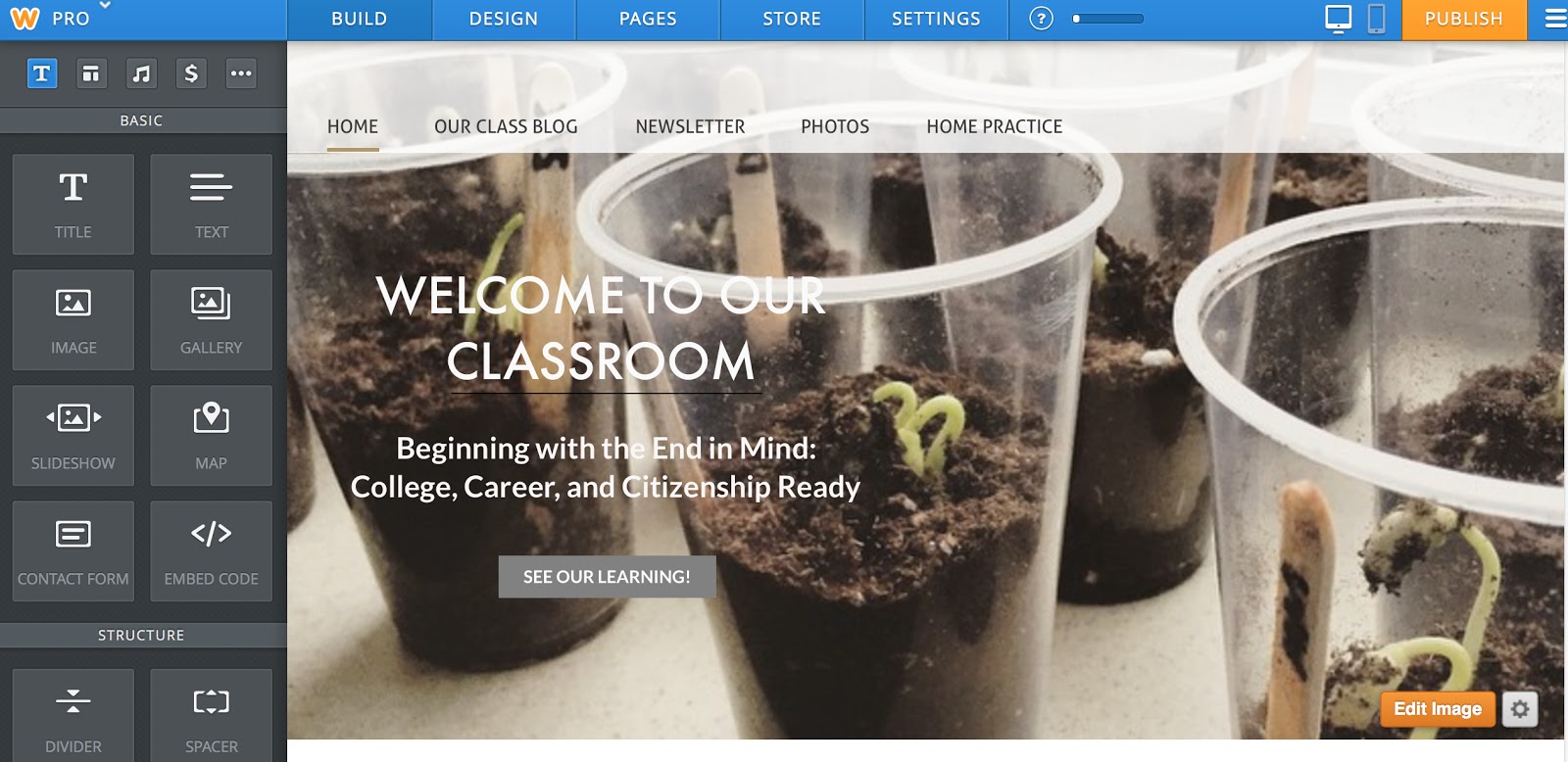
Weebly is a free and SIMPLE blogging platform. Unlike Blogger, Snapfish, or WordPress, Weebly is all drag-and-drop. Once you create a website and choose a template (there are dozens of different templates), you will see the grey menu on the left of your screen (as seen below). Here you have lots of choices that you can drag and drop into the body of your website. Boom – it’s that easy! There is no coding or building or creating, just dragging and dropping the features you want.
Using the blue menu at the top of the screen (seen below), you can also create and organize your web-site pages. On my website I’ve created 4 pages – our Class Blog (an easy feature to add-on to your website), our Newsletter, our Photos, and Home Practice.
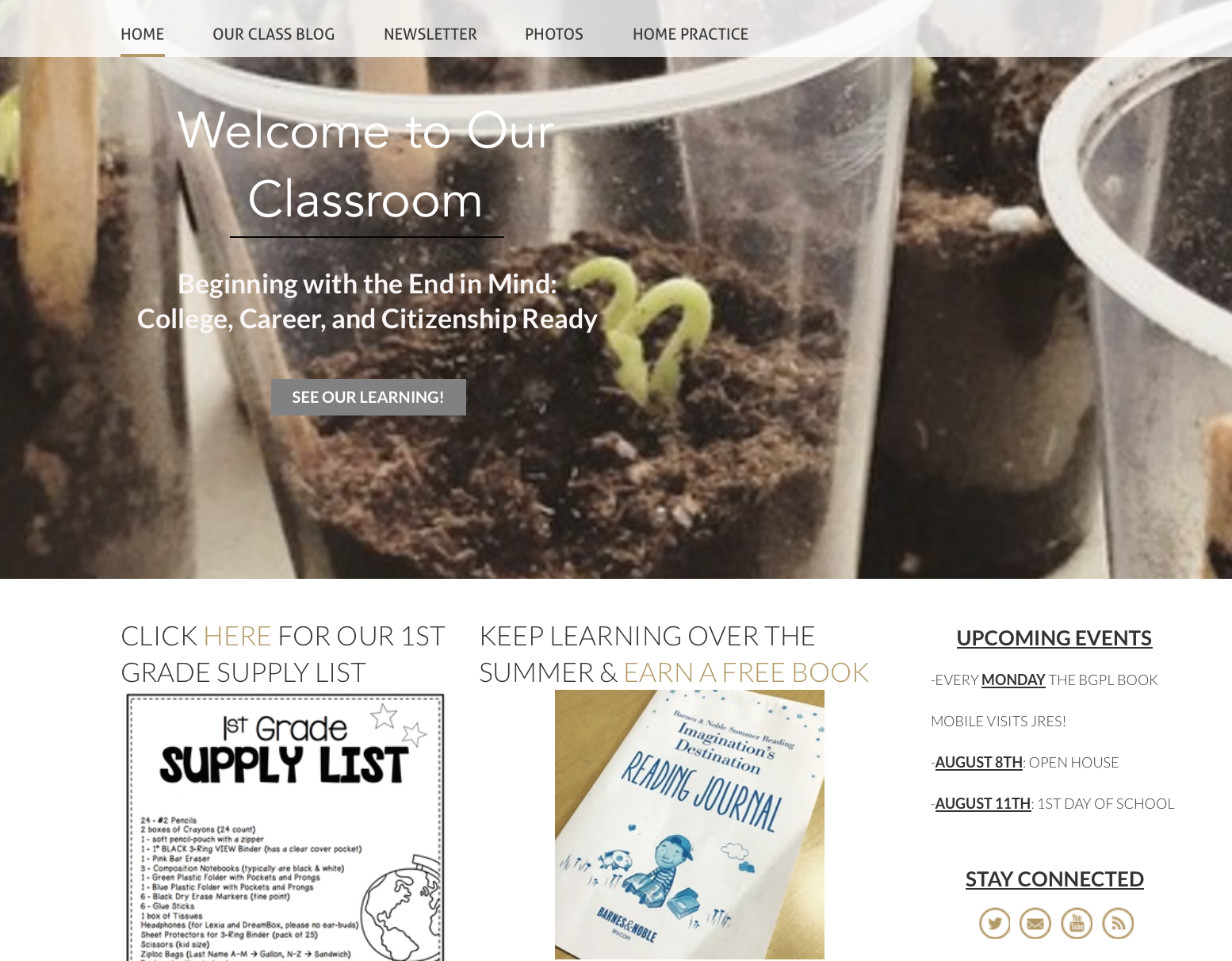
When families go to our website, they arrive at our Home landing page. I created three columns by dragging 3 pictures/text/headings side-by-side (it’s that easy!). If I were to take out the ‘Upcoming Events’ text, the other two columns would automatically fill the page. I wouldn’t have to readjust them.
On our Home page, I typically link 2 blog posts or photo albums that have been recently added. Sometimes I link to outside resources. Right now, I’m linking to Barnes and Noble Summer Reading Program. In the 3rd column, I’ve dragged-and-dropped a text box for Upcoming Events, as well as, ways for families to stay connected (email, Twitter, YouTubes, etc.)
Now, for the individual pages on our class website.
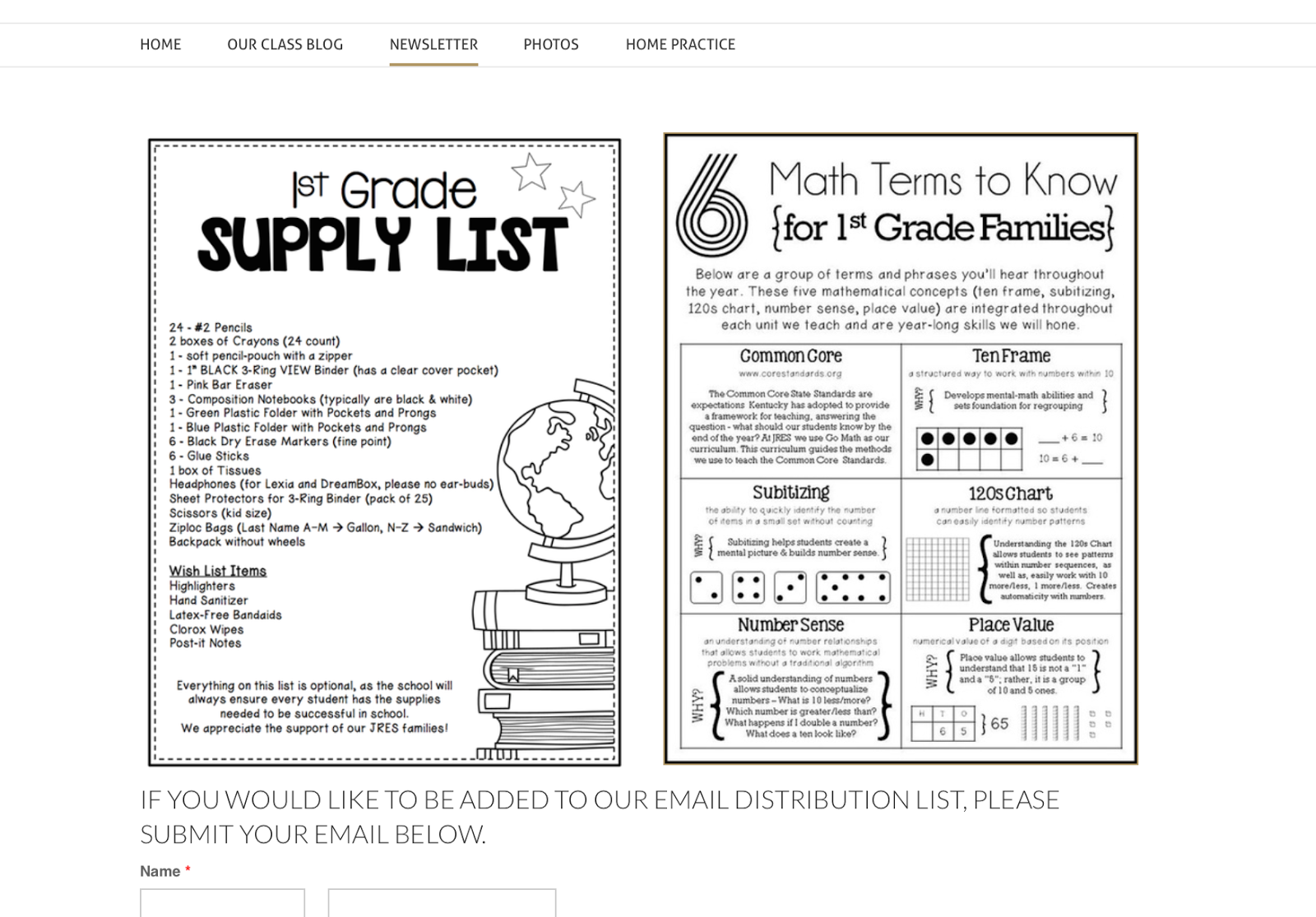
On our Newsletter page (below), I upload photos of our weekly newsletter and any information I’ve sent home in our Home/School folders. Right now, I’m preparing for August, so I traded-out our classroom newsletter for our supply list and math-resource page. Weebly has a great linking feature, so if families click on either photo they can download the documents.
At the very bottom of this page, you can also see the beginning of a Contact Form. This is another drag-and-drop feature on Weebly. If family members or someone in the school wants to be added to our email distribution list, they can fill out the form on this page, I receive an email, and I’ll add them.
On each page of your website, you can choose whether or not you want a header. On our Newsletter page (above), I opted for no header but on our At-Home Practice page (below), I’ve included a simple picture (from Weebly’s stock photos) and a title.
Within each page, you can drag-and-drop pictures, text, headings, or videos. Within our At-Home Practice page, I’ve included logos to learning resources and then, added the weblink so families can click on them and be instantly connected. I’ve also included the usernames and passwords, so there is easy-access on the weekends and over breaks.
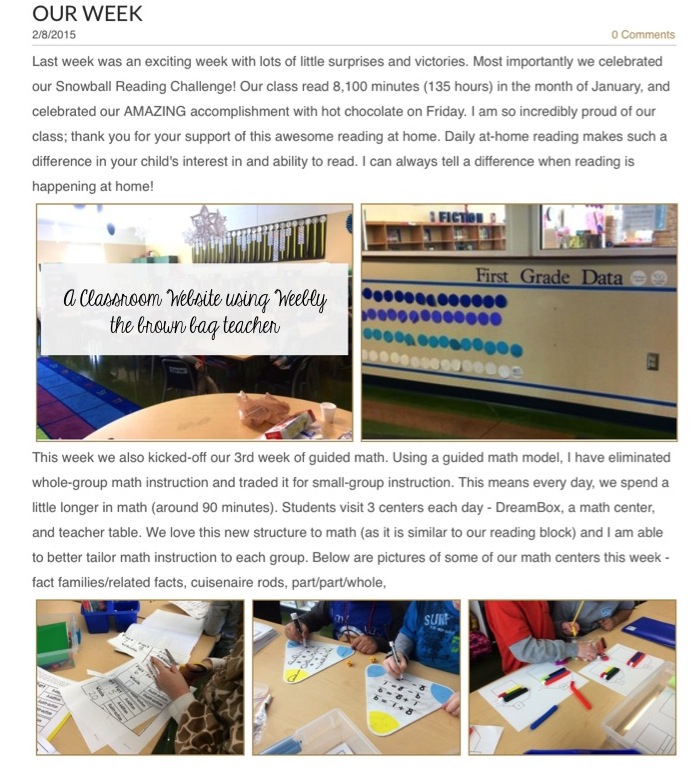
The bulk of my website traffic is directed toward Our Classroom Blog (a sample entry is below). In this space, I share weekly posts about our learning, pictures of us in action, explanations of our classroom routines, and some of the ‘why’ behind the methods we use to learn (i.e. What is Daily 5? Why do we build Reading Stamina? What is Guided Math?).
If students are really struggling with a certain standard (i.e. fact and opinion), I share low-key ideas for practicing this skill at home. With our Classroom Blog, families go from being aware to being invested. I want to give parents a clear picture of what is happening in our classroom, why, and how they can help at home.
Below is the beginning of a February post. (Please excuse the grey rectangle; those are my awesome 1st graders!) Every 2 weeks (preferably more often), I sit down and share about our learning. I try to include information/pictures from each content area – reading, math, writing, and theme. Sometimes I’ll even sneak into specials early and take videos/pictures of my friends painting, tagging, playing xylophones, or learning to type. 🙂
One of the reasons our classroom website works is because I promote it. Every time I post photos or a blog post, I text it out to families using Remind, as well as, Tweet it out using our classroom Twitter account. Also, my 1st graders know we have a class website, and I’ll also tell them when I post. They love going home to ask their families to look at the pictures. It’s super exciting to them!
Now, I must have a moment of true confession. ALL of the above features are available with the FREE Weebly account…but I do pay the pro yearly fee ($80/year). Why, you ask?
(1)Website Traffic – I love my classroom website and truly feel like it’s a fabulous method of communication. BUT if my families weren’t using it, I would want to know that and make another plan. I like seeing how often my website is visited and how people are accessing it (what pages, from what links, etc.) (2) Ad Free – Although there are very few ads (usually just one at the bottom of the page) with a free account, it still drives me bonkers. (3)Password-Protected Pages– with a paid account I can password protect any or all of the pages on my website. So, if I wanted to or families asked, I could put a password on our Classroom Blog or Photos tabs, so only people with the password would have access to these pages.
So friends, this is Weebly. It’s versatile, simple to use, and creates stunning websites. If you’re looking for an online platform for your class website, I’d say – “Go for it!”
Now, please tell me – what do you currently use as your class website platform? Do you like it? I’d love to hear your ideas, questions, and/or general reservations!
Hey Catherine! My wife stumbled across this blog post via Pinterest and promptly sent it to me since I work at Weebly. I'd love to chat with you if you have some time. You can reach me at [email protected].
Thanks for explaining from a user point-of-view why Weebly is better than the site I was recommended. The computer teacher at my school said to use another provider but it seemed so complicated. I don't have time to learn any HTML. This seems so easy and I think I am not only going to make one for my own classes but also recommend it as one that the kids can do for their English projects.
Is there any way I could look at your weebly? What's the link? I am creating mine and would love to get ideas!
Hey Kate,
I am trying to build a new class website from weebly and I checked out yours for inspiration. I was wondering how or where you got that amazing little 5 category ‘announcements’ board with the colours and images that seem to be so convenient and easy to read and understand? I tried making it myself but it flopped.
Thanks so much and thanks for sharing all our amazing ideas!
Hi Kinsey! I made is on Canva (an online design program). Unfortunately, due to copyright I can’t share it. If you wanted to make your own, I would make it in PowerPoint with rectangles and pentagons. 🙂
I have reviewed the page and will research more into how to create a weebly sight
nice informative post. Thanks you for sharing. Weebly is one of the largest site builders with more than 50m websites built. Weebly is an intuitive and powerful online website builder.
From what I read, I think Weebly is very ok, and I will adapt its usage
I will continue to review and figure this out!!
Weebly is a very informative platform.
This was very informative . I didn’t know abut Weebly. I will be looking more in to it. Maybe it ‘ll help me with my class next year.
Get teaching tips and free resources
Practical K-2 math and upper-elementary morphology ideas, straight to your inbox. No spam, unsubscribe any time.



33 Responses
Hey Catherine! My wife stumbled across this blog post via Pinterest and promptly sent it to me since I work at Weebly. I'd love to chat with you if you have some time. You can reach me at [email protected].
Thanks for explaining from a user point-of-view why Weebly is better than the site I was recommended. The computer teacher at my school said to use another provider but it seemed so complicated. I don't have time to learn any HTML. This seems so easy and I think I am not only going to make one for my own classes but also recommend it as one that the kids can do for their English projects.
Jane Osborne @ Customer Finder Marketing
Is there any way I could look at your weebly? What's the link? I am creating mine and would love to get ideas!
Hey Kate,
I am trying to build a new class website from weebly and I checked out yours for inspiration. I was wondering how or where you got that amazing little 5 category ‘announcements’ board with the colours and images that seem to be so convenient and easy to read and understand? I tried making it myself but it flopped.
Thanks so much and thanks for sharing all our amazing ideas!
Hi Kinsey! I made is on Canva (an online design program). Unfortunately, due to copyright I can’t share it. If you wanted to make your own, I would make it in PowerPoint with rectangles and pentagons. 🙂
I have reviewed the page and will research more into how to create a weebly sight
nice informative post. Thanks you for sharing. Weebly is one of the largest site builders with more than 50m websites built. Weebly is an intuitive and powerful online website builder.
From what I read, I think Weebly is very ok, and I will adapt its usage
I will continue to review and figure this out!!
Weebly is a very informative platform.
This was very informative . I didn’t know abut Weebly. I will be looking more in to it. Maybe it ‘ll help me with my class next year.